Start with the game, not a hot-machine hunch. EdgeTilt pairs 300+ AP guides with 18 calculators for evaluating supported machines in their current state. Add an offers calendar with photo import, a W-2G scanner, bankroll and play records, and the subscriber-only Slots Pro Lounge. The tools help you evaluate opportunities and organize your play, not guarantee a win.
In short
Find your game in the guides, then evaluate its current state with a matching calculator. Check bankroll exposure before committing. Plan free-play and dining-credit dates, keep slips and play records together, and use the subscriber-only Slots Pro Lounge to discuss strategy.
More than a number beside a meter
A fat meter can lie to you without saying a word. So can a coin board that looks one coin away from something exciting. You need to know what you're looking at before you decide what it's worth.
300+ AP guides: start with the machine
Search by game, then look beyond its name. Guide cards show game types and thresholds. Full guides cover when to play, when to stop, how to check and risk warnings. Start with the AP guide library to find the game in front of you, instead of borrowing a take point from a similar title.
W-2G scanner: give the slips a home
The scanner offers photo selection and bulk import, with a My W-2Gs archive organized by tax year and a collate-by-payer-EIN option. Learn about the W-2G scanner and slip records before you put another casino slip in the glove box. It's not tax advice or a tax-filing service.
Offers calendar: the mailer belongs on a date
The calendar has an Import from photo(s) option for casino mailers, plus event types for free play, dining credit and other offers. Set dates and keep the offer beside your trip plans. The offers calendar page gives you a quick overview.
Slots Pro Lounge: talk strategy with other APs
The private subscriber group chat gives Slots Edge Pro and Lifetime members a place to discuss strategies and ask other APs for help. If you're an eligible subscriber, open the Slots Pro Lounge to join the conversation.
What advantage play on slot machines means
Some slot machines remember. A meter climbs, a coin grid fills, a bonus builds, and whoever sits down next inherits it. When that leftover value is big enough, the expected return on the next stretch of play can climb past 100%.
That doesn't mean the next spin is due, or that the biggest pot on the screen is always a good bet. A visible jackpot isn't an advantage by itself.
Advantage players look for a specific machine state that makes the next stretch of play worth more than it costs on average. Guides help you recognize what matters. On supported games, a matching calculator helps evaluate the state. Neither turns ordinary slots into beatable games just because you've opened an app.
Which tools help you evaluate and record a play?
18 slot calculators: this game, this setup, this moment
Pick the exact supported game and variant, then enter its meter, board or other state and your bet accurately. The calculators aren't interchangeable. Their model estimates belong to your inputs, not every machine with the same title. Explore the slot calculators and their inputs before you pick one.
Must Hit By, for example, accepts Ainsworth, AGS or IGT presets, or Manual setup. The current meter and must-hit-by value help separate one opportunity from another. The Must Hit By walkthrough explains meter rise, presets and the deeper setup.
Buffalo Link's calculator also includes an Acquisition Fee Calculator section. The Buffalo Link section of the calculator guide introduces the game alongside its related tools.
Machine-photo scanning: less typing on four calculators
Bonus Builder, Temple Falls, Frankenstein and Wheel of Fortune 4D CE support photo scanning for relevant machine inputs. Other calculators use manual entry. The calculator guide's photo-entry examples show where a scan fits into evaluating a supported game.
That isn't whole-machine RTP detection. Check the values against the machine before you lean on the result. If a photo or calculator misses a setting that matters, a polished verdict can still be wrong.
Walk-Away Advisor: a suggested stop, not an expired edge
On a +EV play, the Walk-Away Advisor suggests a stopping point to consider because the swings can be rough. Getting ahead doesn't erase positive expected value. It's a volatility decision, not a rule that a machine turns bad when you reach a profit target. Read the Walk-Away Advisor explanation for that distinction before you treat the suggestion like an order.
Bankroll Risk: can you afford the bad version?
A play can be worth more than it costs on average and still lose money. Bankroll Risk connects the calculators with Bankroll Manager so you can compare the play's potential downside with a risk percentage of your recorded bankroll. The Bankroll Risk explanation walks through budget, potential loss and coverage.
The point isn't a green light for every +EV estimate. A more volatile game or a bigger bet can ask for a very different bankroll.
Bankroll Manager: keep the whole trip in view
Track sessions and rebuys, then review your bankroll and results through Overview, Locations, Charts and Trend, including the Monte Carlo option. A casino visit and a single machine aren't the same record. Learn how Bankroll Manager tracks sessions and bankroll so a memorable hit doesn't become your entire account of the trip.
Play Logbook: keep the machine-level details too
Log any play at any time with + Log Play. A calculator's Log play in Logbook button can prefill supported play data. It saves typing. It doesn't limit what you can record. Custom game templates let you choose fields for games you log repeatedly. LOG, ANALYZE and LEDGER separate entry, review and ledger views. The Play Logbook guide explains those records and the connection to W-2G scanning.
Sessions and individual plays answer different questions. Keep both, and “how did the trip go?” won't bury what happened on one machine.
How do you check whether the machine in front of you is worth playing?
Find the exact game in the guides. Check its mechanics and warnings. A similar title isn't enough.
Use the matching calculator if supported. Enter the current meter, board, ways, spins, symbols or other required state. Match your bet and denomination too.
Read the estimate and verdict. That read belongs to your inputs, not to every machine with the same name.
Check your exposure. Set the bankroll risk you can accept, not the one you wish you could. Consider any suggested stopping point without mistaking it for a guarantee.
Record the play. Write down the result while the details are fresh, not from memory after the drive home.
On Bonus Builder: Emerald Spins, a fresh board at $1.00 per spin uses 243 ways, 8 spins and 0 symbols removed for each color. The calculator reads 64.9% RTP and says “Still -EV Keep Waiting.”
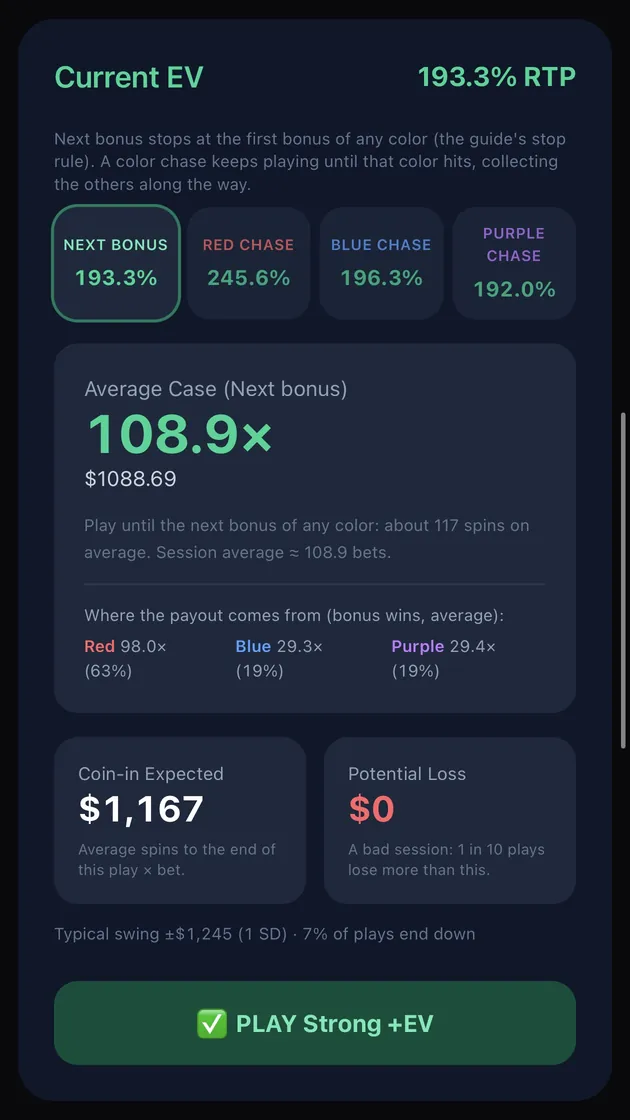
On the documented board at $10.00 per spin: Red has 2,400 ways, 17 spins and 4 symbols removed; Blue has 1,920 ways, 13 spins and 1 symbol removed; Purple has 1,600 ways, 11 spins and 2 symbols removed. Its Next bonus read is 193.3% RTP, with the verdict “PLAY Strong +EV.”
At $1.00 with an empty board, it says wait. At $10.00 with those states entered, it puts 193.3% beside Next bonus and says play. Same game. Opposite calls.
Documented board: the $10 bet and Red, Blue and Purple inputs above produce the displayed model estimate, not a promised payout or a real-money result.
Neither number is a promised result. They show what changes when the inputs and bet change, using the calculator's model. The first number tells you to keep waiting even when the machine looks tempting. The second gives a calculated reason to look into the play, not a certified payout.
When should you walk past an advantage play slots app?
When it gives one verdict for a whole game title, ignores the current state, or turns a favorable estimate into a promise of winnings. A useful tool shows its inputs and leaves room for a no.
If EdgeTilt doesn't support the game or variant in front of you, the honest answer isn't a substitute calculator and a hopeful guess. Pass on the calculation. A guide and a calculator do different jobs. A guide listing doesn't mean that game has a calculator.
Even a supported game needs correct settings and a bankroll talk after the EV number shows up. Calendars, records and community conversations help with the work around a play. They don't make its odds better.
FAQ
How do I know if EdgeTilt covers my machine?
Search the AP guides for the exact title and relevant variant. The guide library and the 18 calculators are different kinds of coverage: a guide doesn't imply there's a calculator for that game. If you use a calculator, compare its fields with the machine in front of you. Don't substitute a generic estimate.
Do I need a big bankroll to start advantage play?
There isn't one sensible starting number for every game. Your bet, potential loss and the game's volatility change the exposure. A positive average value doesn't tell you whether one bad run is affordable, so compare a proposed play with a bankroll you can actually afford to lose.
Can an app read a slot machine from a photo?
On EdgeTilt, Bonus Builder, Temple Falls, Frankenstein and Wheel of Fortune 4D CE have photo input for supported machine values. It isn't whole-machine RTP estimation. Check the values against the machine before trusting the estimate. The calendar's mailer-photo option and the W-2G scanner serve different purposes, not machine evaluation.
Can a +EV slot play still lose money?
Yes. Positive expected value describes the average result under the model and inputs, not what happens on your next attempt. Bankroll Risk helps you look at downside before committing money. The Walk-Away Advisor suggests a volatility-based stopping point. It doesn't erase +EV or guarantee that you leave ahead.
Is it legal to play advantage slots or use an app in a casino?
Ordinary play and using an analytical app or device aren't necessarily treated the same way. Laws vary by jurisdiction, including rules about devices and software that help a player analyze a game, and casinos can also restrict advantage play or photography. Using an app inside a casino can be a bad idea even where the app itself is legal. Check your local law and the venue's rules. EdgeTilt doesn't give legal advice.
Calculator results are model estimates, not guarantees. Casinos may restrict advantage play. You must be 21+ to gamble. If gambling stops being fun, call 1-800-GAMBLER.