

Overview
What's on it
Overall bankroll, all-time P/L, sessions, average per hour and Session History
Bankroll Manager
EdgeTilt's Bankroll Manager tracks every slot session: where you played, what you started with, your rebuys and what you walked out with. It keeps your overall bankroll current and breaks results down by casino, day and session length. Bankroll Risk in the calculators reads that bankroll, so each play is sized to what you actually have.
In short Start a session, add rebuys, end it, and your bankroll updates. See results by casino, by chart and by trend, plus Advanced Metrics. Bankroll Risk reads this bankroll to size each play. Missed a session? Log it later or import from CSV. Everything lives in your Slots bankroll hub.
Up or down this year? By how much?
Had to think about it? The Bankroll Manager has the answer on its Overview tab. All-time P/L, to the dollar.
It's all in your slots bankroll hub.
What's on it
Overall bankroll, all-time P/L, sessions, average per hour and Session History
What's on it
Sessions, hours, $/hr, win % and total for each casino
What's on it
P/L by day of week, by month and by session length
What's on it
Running P/L with peak and trough, time filters, and an optional Monte Carlo projection 50, 100 or 200 sessions ahead
Under Trend, Advanced Metrics adds win rate, expectancy, profit factor, payoff ratio, max drawdown, recovery factor, risk of ruin, Kelly, standard deviation, skewness, Sortino, Calmar, Ulcer Index and win and loss streaks. Risk of ruin comes from 5,000 simulations drawn from your own session history. Full metric guide.
Here's the part that changes how you play.
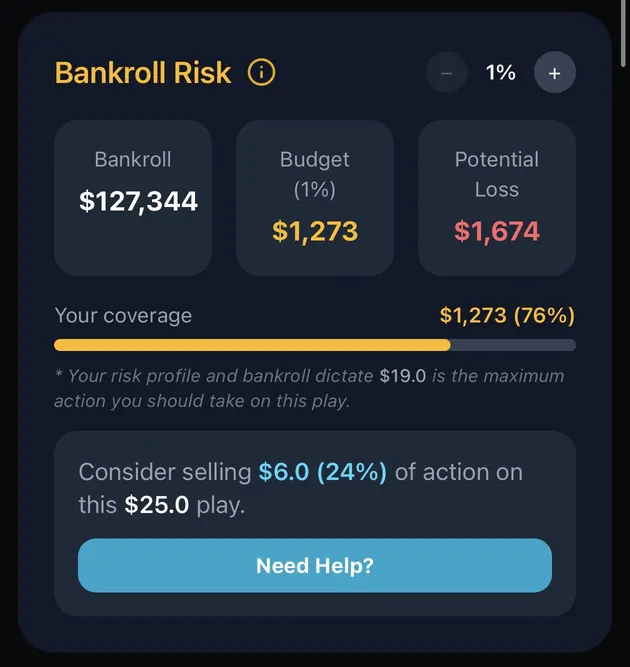
In a slot calculator, scroll down to Bankroll Risk. That Bankroll number is yours, pulled from the Bankroll Manager. You set a risk percent with the stepper (1% above), and the card shows:
Play runs past your budget? It tells you straight: "Your risk profile and bankroll dictate $19.0 is the maximum action you should take on this play," and suggests "Consider selling $6.0 (24%) of action on this $25.0 play."
Here's the loop. You play. You end the session. Your bankroll moves. And the next play is sized to the new number. Bankroll goes up, and your budget per play rises with it. Bankroll down, and the budget shrinks, so the next play is sized smaller.
Yes. Bankroll Risk reads your overall bankroll from the Bankroll Manager.
Yes. Use Log previous session(s), or import from CSV.
The Bankroll Manager tracks sessions and your overall bankroll. The Play Logbook tracks individual plays.
On the Bankroll Risk card, with the - / + stepper.
Results are your own tracked history and model estimates, not a guarantee of future results. You must be 21+ to gamble. If gambling stops being fun, call 1-800-GAMBLER.