


Tournament poker swings harder than almost anything else in gambling. You can be a strong winner and still go hundreds of events without a big score. A tournament variance calculator puts numbers on that, so you know what normal looks like before a cold run makes you doubt yourself.
Open the EdgeTilt Poker Variance Calculator in tournament mode and follow along. It's free, needs no login, and runs in your browser. This guide goes through each input, each result, the math, and where the estimate falls short.
What you get from it
- Your expected profit over a schedule of events
- How wide the spread of results is, in dollars
- A low and high end for where you'll probably finish
- The odds a winning player ends the schedule down
Quick start
- Pick a Confidence level (95% is a good default).
- Enter your ROI, Buy-in and the number of Tournaments.
- Either type your Standard deviation (buy-ins) or leave it blank and enter a Field size.
- Check SD source so you know which one the page used, then read the results.
The math in plain words
Each tournament has an average result (your ROI times the buy-in) and a swing around it, measured as a standard deviation in buy-ins. Add up many tournaments and your total lands on a bell curve, the same way it does for cash games.
- Expected profit = ROI × buy-in × tournaments
- 1 SD swing = SD per tournament (in buy-ins) × buy-in × √tournaments
- Confidence range = expected ± z × swing, where z is 2 at 95%, 1.645 at 90% and 2.576 at 99%
- Chance of a loss = the share of the bell curve below zero
Your expected profit grows in a straight line with volume, while your swing only grows with the square root. Play enough and your edge wins. With tournaments, "enough" is a lot.
Where the standard deviation comes from
The swing per tournament is the input that matters most. The page gets it one of two ways.
You type it. If you know your standard deviation in buy-ins (some trackers report it), enter it and the page uses it as is. Field size is ignored.
The page estimates it from field size. Leave Standard deviation (buy-ins) blank and the page uses a winner-take-all model. In that model you either win the whole prize pool or lose your buy-in. Your ROI sets how often you win: with a 20% ROI in a 100-player field, you win 1.2 times per 100 events instead of once. From that, it works out the swing.
Winner-take-all is a shortcut, on purpose. Real tournaments pay a ladder of places, which spreads the money around and makes results less swingy. So the field estimate is higher than your real variance, often by a lot. It also ignores rake and satellites. Treat it as a rough upper end, not a prediction.
The inputs
Confidence
90%, 95% or 99% sets how wide the Confidence range is. At 95% the page uses exactly two standard deviations. It only changes the range.
ROI (%)
Your average return per tournament, as a percent of the buy-in. A 20% ROI means you make $20 per $100 buy-in on average. Negative values work.
Buy-in ($)
The cost of one tournament in dollars. Must be above zero.
Field size
How many players enter a typical event. It's only used when the standard deviation box is blank. It needs to be 2 or more. A very high ROI in a small field can be impossible in the model (you can't win more than every time), and if so the page asks you to adjust.
Standard deviation (buy-ins)
Optional. Your per-tournament swing in buy-ins. Fill it in if you know it, and the page skips the field estimate.
Tournaments
How many events you want to look at.
The results
- Expected profit: what you'd make on average over this many events.
- 1 SD swing: the typical distance between your real result and expected.
- Confidence range: where your result should land at the confidence you picked. If the low end is below zero, finishing this stretch in the red is a normal outcome.
- Chance of a loss: the odds you finish below zero despite a winning ROI.
- SD per tournament (buy-ins): the swing used in the math, either yours or the estimate.
- SD source: shows Typed if you entered it, or Field estimate if the page worked it out.
Worked example: the page's defaults
The page opens with ROI 20, Buy-in 100, Field size 100, Tournaments 500, a blank standard deviation and Confidence 95%.
- SD per tournament (buy-ins): 10.89, from the Field estimate
- Expected profit: 0.20 × $100 × 500 = $10,000
- 1 SD swing: 10.89 × $100 × √500 ≈ $24,350
- Confidence range: about -$38,695 to $58,695
- Chance of a loss: 34%
Read that again. The swing is more than twice your expected profit, and the model says a 20% ROI player loses over 500 events about a third of the time. That's the winner-take-all model at work. With a real payout ladder the swing is much smaller (roughly a third as big in the EdgeTilt app's model), so the true chance of a loss is lower.
Worked example: typing your own SD
Keep the defaults but type 6 into Standard deviation (buy-ins). SD source switches to Typed and field size no longer matters.
- Expected profit: $10,000
- 1 SD swing: $13,416
- Confidence range: about -$16,833 to $36,833
- Chance of a loss: 23%
If you have a real number for your standard deviation, use it. It beats the field estimate every time.
Worked example: volume and field size
| Setup (20% ROI, $100 buy-in, SD blank) | SD (buy-ins) | Expected profit | Confidence range (95%) | Chance of a loss |
|---|---|---|---|---|
| 100 players, 500 events | 10.89 | $10,000 | -$38,695 to $58,695 | 34% |
| 1,000 players, 500 events | 34.62 | $10,000 | -$144,826 to $164,826 | 45% |
| 100 players, 5,000 events | 10.89 | $100,000 | -$53,987 to $253,987 | 10% |
Bigger fields mean bigger swings, because the top prize is a bigger share of a bigger pool. Volume is the fix: ten times the events cuts the chance of a loss from 34% to 10% in the model.
Where to get good inputs
- ROI: use your tracked number over as many events as you have, and shade it down if the sample is small. Tournament ROI takes thousands of events to pin down, so a hot year overstates it.
- Buy-in: the full price you pay, fees included. Base your ROI on that same full price.
- Field size: your typical event. If you play two very different kinds of events, run each one separately rather than averaging.
- Standard deviation: if your tracker reports it in buy-ins, type it. It beats the estimate.
Common mistakes
- Reading the field estimate as your real risk. It's winner-take-all, so it's an upper bound.
- Averaging two different schedules into one field size. A mix of 80-player and 2,000-player events doesn't behave like 1,000-player events.
- Plugging in a dream ROI. Run your plan at a lower ROI too. If it only works at the high number, it doesn't work.
- Forgetting the median. Positive expected profit doesn't mean you'll probably be up. Most of the expected value sits in rare big scores.
How to use it well
- Type your SD when you can. It turns a rough guess into a useful number.
- Treat the field estimate as a worst case. If your bankroll survives the winner-take-all range, it'll survive the real one.
- Think in buy-ins. A range of tens of buy-ins either way is normal over a few hundred events.
- Log your results. The EdgeTilt poker bankroll tracker keeps your ROI and volume current, so your inputs match how you actually play.
Limits of this calculator
This is a quick estimate. The field mode assumes winner-take-all, so it overstates variance compared with real payout structures. It ignores rake, satellites, bounties and re-entries. And a bell curve is only a rough fit for tournament results, which are mostly small losses with rare big wins. Over a few hundred events, real results are more lopsided than the range shows.
FAQ
Why is the field estimate so high? It assumes you either win everything or lose your buy-in. Real tournaments pay many places, so your actual swings are smaller.
What standard deviation should I type? Use your tracker's number if it has one. If not, leave it blank and treat the result as an upper bound.
Does it account for rake? No. Enter ROI after rake, and know the model doesn't adjust for it.
Does the calculator send my numbers anywhere? No. It runs in your browser and nothing is sent to EdgeTilt.
Go deeper in the app
The free page uses winner-take-all as a stand-in. The full variance calculator in the EdgeTilt app, under Poker > Variance, models how tournaments really pay. It's free with an account. Below, each part is explained in the order you'll see it, using one example run: $100 buy-in, 10% rake, 100 entries, 15% paid, 20% ROI, 500 events.
A payout curve fit to real events
Instead of one winner taking everything, the app builds a full payout table for every event. The curve was fit to 102 live events from 2025 (WSOP, Wynn and Venetian DeepStack series, paying 12.5 to 15% of the field). First place gets about 27% of the pool at 100 entries, 17% at 1,000 and 9% at 10,000, and the lowest paid places get a min cash. That matters because real payouts swing far less than winner-take-all.
Rake
Each tournament type takes a Rake as a percent or a dollar amount (tap Use $ or Use % to switch). The Buy-in is the full price you pay, and the rake is taken out of it before the rest goes into the prize pool. ROI is measured as profit over that total cost. So your ROI reflects what you actually pay to play.
Entries and % paid
Set Entries for the field size and Paid for the share of players who cash. Each card then shows your ITM rate, the prize pool, the first-place prize, EV per event and SD per event. Move Paid from 10% to 20% to see fast how flatter structures calm your swings.
In the example, your ITM rate is 20%, the prize pool is $9,000 (100 players at $90 after rake) and first place pays $2,417.
Up to six tournament types with Add type
Hardly anyone grinds just one buy-in. Tap Add type to build a schedule of up to six tournament types, each with its own buy-in, rake, entries, paid %, ROI and number of Events. The app mixes them evenly through your schedule, so the results match your real mix of small daily events and bigger weekend ones.
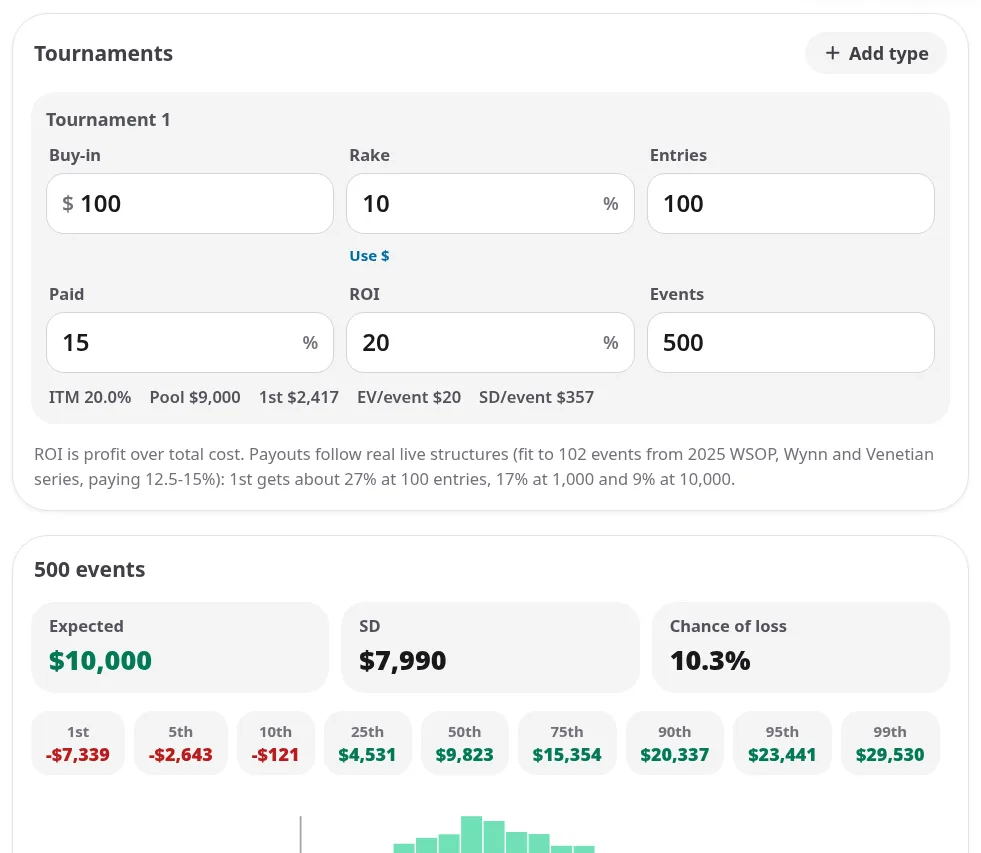
A tournament type card with its ITM rate, prize pool and first prize, next to the headline results.
The finish simulation
The app simulates where you finish in every event, using your ROI to raise your chances of each paid place by the same factor. It plays the schedule thousands of times (up to 20,000 runs, depending on schedule size) and shows Expected, SD and Chance of loss. Because it simulates real finishes, the chance of loss reflects the lopsided shape of tournament results instead of a bell curve.
For the example schedule, expected profit is $10,000 with an SD of $7,990, and the chance of loss is 10.3%. Compare that with the free page's winner-take-all estimate for similar inputs, where the swing came out about three times bigger. Real payouts make the picture far less scary, but one schedule in ten still finishes in the red.
Percentiles
A row of percentiles (1st, 5th, 10th, 25th, 50th, 75th, 90th, 95th and 99th) shows the spread of outcomes. Watch the median (50th). In tournaments it usually trails the average, because a few big scores carry the mean. Most players finish below their own expected profit. That's normal.
The histogram
The histogram charts how often each result happened across all simulated schedules. Expect a big hump of small losses and small wins, then a long tail to the right. That tail is where your edge lives, and it's why you need volume to collect it.
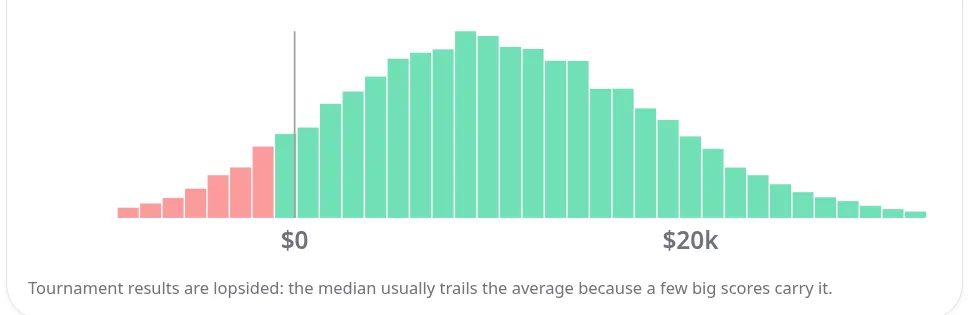
How often each result came up across all simulated schedules. Note the long right tail.
Sample paths
Twenty simulated runs through your schedule are drawn against your expected line. Tap Re-roll for a fresh set. Flat stretches with sudden jumps are exactly what a winning tournament graph looks like.
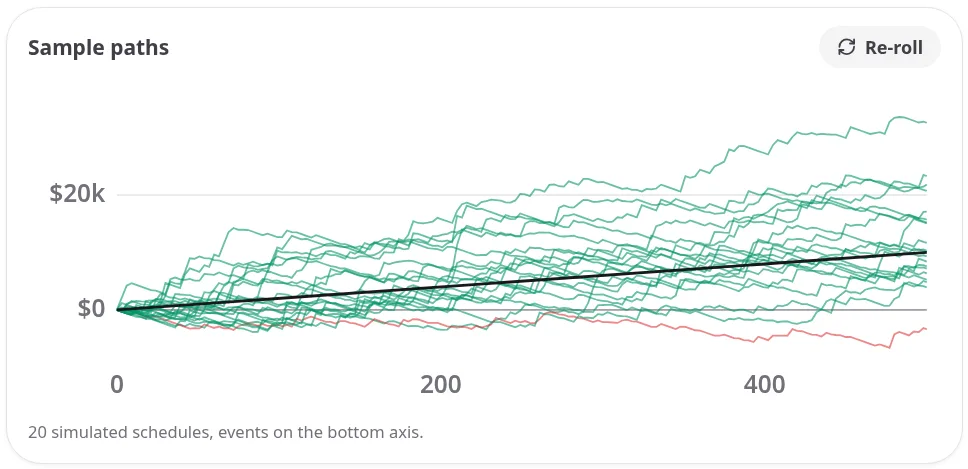
Long slides, then a jump from one deep run. That's a normal winning graph.
The risk of ruin table
Bankroll for risk of ruin gives the starting bankroll that keeps your chance of going broke at 50%, 20%, 5% or 1%. Forever assumes you never stop and is solved from the same finish model as the simulation, so lopsided payouts are counted exactly. The Over column (for example, "Over 500 events") covers only your schedule. It's the clearest answer to "how many buy-ins do I need?"
In the example, a 1% risk of ruin takes $12,158 forever, or $10,171 over the 500 events. That's roughly 122 and 102 buy-ins.
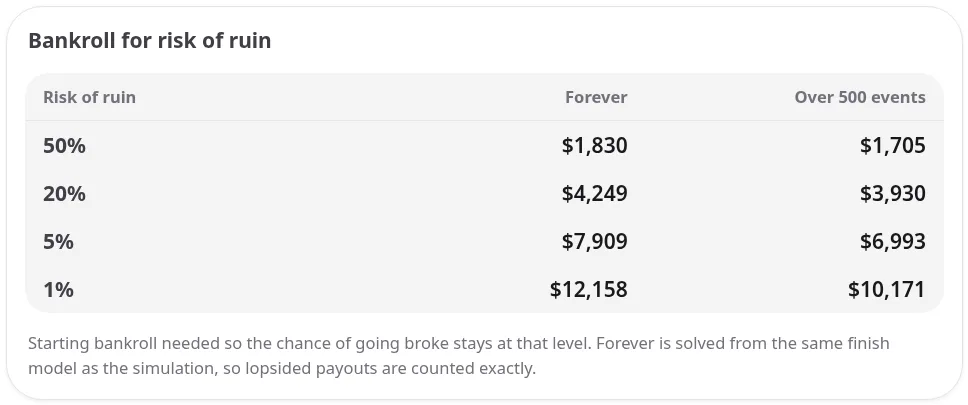
Bankroll needed at each risk of ruin level, forever and over this schedule.
Quick start in the app
- Sign in and open Poker > Variance, tournament tab.
- Fill in a tournament type: buy-in, rake, entries, paid %, ROI and events.
- Tap Add type for each other kind of event you play.
- Read the headline numbers, then the percentiles, histogram, paths and risk of ruin table.
Try it free
Sign up at edgetilt.com to use the full variance calculator under Poker > Variance, alongside the poker bankroll tracker that keeps your ROI and volume current. Until then, the free tournament variance calculator is a click away.